Stateful Functors
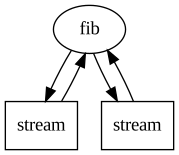
Often one will want to perform transformations that keep track of some state. Here we show two ways of doing this. The first (preferred method) uses a Python Class to define the functor object which is initialized on the local process. The second uses the PipeSystem API to define a graph with a looping topology where the state is stored in the Streams instead of the functor object.
Simple Moving Average
Here we demonstrate how to use Class functors. All pipe segments may use Class functors as long as the Class has a run method implemented. The run method plays the role of the standard functor, operating on each data chunk in the stream. Additionally the user may define two other methods local_init and local_term, which are executed once on the local process on initialization and termination respectively.
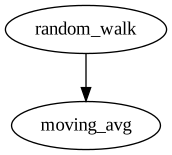
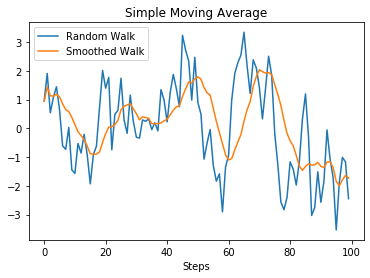
The following example shows how to use a Source and Sink with Class functors. First a random walk is generated from random data, where the location of the previous step is persisted on the local process. Then a moving average is calculated with a queue persisted on the Sink process. Normally only the data in the queue needs to be persisted but for demonstration purposes we persist all values and moving averages to be plotted after the pipeline has terminated.
[1]:
import minipipe as mp
import numpy as np
import matplotlib.pyplot as plt
%matplotlib inline

class generate_rand_walk:

    def __init__(self, n_steps=100):
        self.n_steps = 100

    def local_init(self):
        self.last_step = 0

    def run(self):
        for _ in range(self.n_steps):
            step = np.random.randn() + self.last_step
            self.last_step = step
            yield step

class simple_moving_average:

    def __init__(self, window_size = 10):
        self.window_size = window_size

    def local_init(self):
        # This method initializes on the local process
        self.queue = []
        self.values = []
        self.means = []

    def run(self, data):
        # Enqueue data
        self.queue.append(data)

        # Dequeue data once window size has been reached
        if len(self.queue) > self.window_size:
            self.queue.pop(0)

        # Calcualte moving average
        ma = sum(self.queue)/len(self.queue)

        # Save values and moving averages for plotting at term
        # Normally you wouldn't save these values bc data scale may cause OOM error
        self.values.append(data)
        self.means.append(ma)

    def local_term(self):
        # This method runs once on the local process at termination
        # Here we simply plot the results
        steps = range(len(self.values))
        plt.plot(steps, self.values, label='Random Walk')
        plt.plot(steps, self.means, label='Smoothed Walk')
        plt.title('Simple Moving Average')
        plt.xlabel('Steps')
        plt.legend()
        plt.show() # This is necessary since plot in on local process
[2]:
rw = generate_rand_walk(100)
sma = simple_moving_average(10)

pline = mp.PipeLine()
pline.add(mp.Source(rw, name='random_walk'))
pline.add(mp.Sink(sma, name='moving_avg'))

pline.build()
pline.diagram()
[2]:
[3]:
pline.run()
pline.close()
2020-01-03 16:21:25,161 - INFO - random_walk - End of stream
2020-01-03 16:21:25,165 - INFO - random_walk - Local termination
2020-01-03 16:21:25,167 - INFO - moving_avg - Local termination
Fibonacci Sequence with Loops
With the PipeSystem API its possible to build graphs with loops. Loops can be used to store states in a Stream by passing the data back to an upstream. Here’s a fun and useless example calculating the Fibonacci sequence with a stateless functor.
[4]:
from multiprocessing import Event

# minipipe uses multiprocessing Events for termination flags
term_flag = Event()
n = 1000 # max fib number

def fib(x_1, x_2):

    print(x_1)

    # terminate when n is reached
    if x_2 >= n:
        term_flag.set()

    return x_2, x_1 + x_2
[5]:
# initialize streams
s1 = mp.Stream()
s2 = mp.Stream()

# initialize streams instead of using a Source
s1.q.put(0)
s2.q.put(1)

p = mp.Transform(fib, 'fib', upstreams=[s1, s2], downstreams=[s1, s2])
p.set_term_flag(term_flag) # term flag needs to be set explicitly

psys = mp.PipeSystem([p])
psys.build()
psys.diagram(draw_streams=True)
[5]:
[6]:
psys.run()
psys.close()
0
1
1
2
3
5
8
13
21
34
55
89
144
233
377
610
987